Download this notebook from github.
Basic Usage
Climate indicator computations
xclim is a library of climate indicators that operate on xarray objects. Indicators perform health checks on input data, converts units as needed, assign nans when input data is missing, and format outputs according to the Climate and Forecast (CF) convention. As the list of indicators has grown quite large, indicators are accessed through their realm (xclim.indicators.atmos, xclim.indicators.land and xclim.indicators.seaIce, plus the
special xclim.indicators.convert and xclim.indicators.generic) to help browsing indicators by the domain they apply to. Some more indicators are in project/institution-specific collections : xclim.indicators.cf holds the indicators defined by Clix-Meta, xclim.indicators.icclim for ECAD/ICCLIM and xclim.indicators.anuclim for
Anuclim. See Climate Indicators for a list of available indicators.
Indicators should not be confused with compute functions, which define the algorithmic layer of each indicator. Those functions perform no checks beyond units compliance, and should be considered as low-level functions. See the respective documentation on indicators and compute functions for more information. These “compute functions” were previously named “indices”.
[1]:
from __future__ import annotations

import xarray as xr

import xclim
from xclim.testing import open_dataset
Indicators are calculated by opening a NetCDF-like file, accessing the variable of interest, and calling the appropriate indicator function, which returns a new xarray.Dataset with the result.
For this example, we’ll first open a demonstration dataset storing surface air temperature and compute the number of growing degree days (the sum of degrees above a certain threshold) at the yearly frequency. The time frequency parameter, here YS, is specified using pandas offset aliases. Note that some offsets might not be supported for non-standard calendars (e.g. 360_day), see the
xarray.cftime_range documentation for details.
[2]:
# Normally, we would use xarray to open a dataset, e.g.:
# ds = xr.open_dataset("your_file.nc")

# For this example, let's use a test dataset from xclim:
ds = open_dataset("ERA5/daily_surface_cancities_1990-1993.nc")
ds.tas
[2]:
<xarray.DataArray 'tas' (location: 5, time: 1461)> Size: 29kB
[7305 values with dtype=float32]
Coordinates:
  * location  (location) <U9 180B 'Halifax' 'Montréal' ... 'Victoria'
    lon       (location) float32 20B ...
    lat       (location) float32 20B ...
  * time      (time) datetime64[ns] 12kB 1990-01-01 1990-01-02 ... 1993-12-31
Attributes:
    cell_methods:       time: mean within days
    long_name:          Mean daily surface temperature
    original_variable:  t2m
    standard_name:      air_temperature
units: KIndicators are called as if they were functions.
[3]:
gdd = xclim.atmos.growing_degree_days(tas=ds.tas, thresh="10.0 degC", freq="YS")
gdd
[3]:
<xarray.Dataset> Size: 332B
Dimensions:              (location: 5, time: 4)
Coordinates:
  * location             (location) <U9 180B 'Halifax' 'Montréal' ... 'Victoria'
    lon                  (location) float32 20B ...
    lat                  (location) float32 20B ...
  * time                 (time) datetime64[ns] 32B 1990-01-01 ... 1993-01-01
Data variables:
    growing_degree_days  (location, time) float32 80B 776.9 703.9 ... 567.8
Attributes:
history: [2026-11-04 22:07:56] growing_degree_days: growing_degree_days(...growing_degree_days makes most sense with daily input, but could theoretically accept other source frequencies.
This indicator has one argument thresh that represents a temperature threshold. When a single (scalar) value must be given, xclim accepts a string of the value with units. It will not accept a simple number as units can’t be inferred. Usually, xclim will also accept DataArrays with units for this kind of argument, as long as xarray is able to broadcast and align it with the input variable.
Finally, like almost all indicators, the function takes a freq argument to specify over what time period it is computed. These are called “Offset Aliases” by Pandas and are the same as the resampling string arguments (in xr.DataArray.resample). Valid arguments are detailed in pandas docs (note that aliases involving “business” notions are not supported by xarray and thus could raise issues in
xclim).
Attributes: xclim added a global history attribute to the dataset, as well as other attributes to the output variable: standard_name, cell_methods, long_name , description, with the latter two formatted to include some information about the inputs. Of course, xclim updated the units, but also added units_metadata, required by the CF-Conventions to specify how temperature units should be interpreted. Finally, it added an xclim_description attribute that
summarizes the computation done, similar to the history but without all the datetime, version, and provenance tracking.
Units handling paradigm
Indicators and compute functions are written in order to be flexible as to the sampling frequency and units of the data. You can use growing_degree_days on, for example, the 6-hourly data, but the output will then be in degree-hour units ("K h"). Moreover, all units, even when untouched by the calculation, will be reformatted into a CF-compliant symbol format. This behaviour was chosen to ensure consistency between all compute functions.
Indicators will always convert their output data into a specific unit, the one listed in [indicator].outputs, a list of metadata stores. For example here:
[4]:
xclim.atmos.growing_degree_days.outputs[0]
[4]:
<Output growing_degree_days (dimensionality='[data][time]', units='K days') : long_name='Cumulative sum of temperature degrees for mean daily temperature above {thresh}', standard_name='integral_of_air_temperature_excess_wrt_time', cell_methods='time: sum over days', description='{freq} growing degree days (mean temperature above {thresh}).'>
This doesn’t apply to the compute functions. Very few compute functions will convert their output to specific units; Rather, it is the dimensionality that will be consistent on output.
Conventions
As you may have noticed, the growing_degree_days function above was not told along which dimension to operate. In xclim, the temporal dimension is always assumed to be named "time". All functions which reduce or compute over that dimension will expect that name. If you ever have another name in your data, you can simply rename it like:
ds = ds.rename(T="time")
For other names and attributes, xclim tries to follow different sets of conventions. In particular, input data should follow the CF conventions whenever possible for variable attributes. Variable names are usually the ones used in CMIP, when they exist. When a function needs to read the spatial coordinates, it will usually rely on CF conventions, through cf-xarray.
Indicator objects
Indicators are the core class of xclim. They act as compute functions with health checks and metadata attributes. Some checks involve:
Warning on missing input metadata
Identifying periods where missing data impacts the calculation and omit calculations for those periods. Those are called “missing methods” and are detailed in section Health checks.
Appending process history and maintaining the historical provenance of file metadata.
Writing Climate and Forecast Convention compliant metadata based on the variables and indicators calculated.
If we run the growing_degree_days indicator over a non-daily dataset, we’ll be warned that the input data is not daily. That is, running xclim.atmos.growing_degree_days(ds.air, thresh='10.0 degC', freq='MS') will fail with a ValidationError:
[5]:
# Show that data is not at a daily time frequency

ds6h = xr.tutorial.load_dataset("air_temperature")
xr.infer_freq(ds6h.time)
[5]:
'6h'
[6]:
gdd = xclim.atmos.growing_degree_days(tas=ds6h.air, thresh="10.0 degC", freq="MS")
gdd
---------------------------------------------------------------------------
ValueError                                Traceback (most recent call last)
ValueError: Frequency of time series not strictly in ['D']. To mute this, set xclim's option data_validation='log'.

The above exception was the direct cause of the following exception:

ValidationError                           Traceback (most recent call last)
Cell In[6], line 1
----> 1 gdd = xclim.atmos.growing_degree_days(tas=ds6h.air, thresh="10.0 degC", freq="MS")
      2 gdd

File ~/checkouts/readthedocs.org/user_builds/xclim/conda/stable/lib/python3.12/site-packages/xclim/core/indicator/_indicator.py:1425, in _DeprecationWarner.__call__(self, *args, **kwargs)
   1417         vv = self._version_deprecated
   1418     warnings.warn(
   1419         f"`{self.title}` is deprecated as of `xclim` v{vv} and will be removed in a future release. "
   1420         f"{alternative} See the `xclim` release notes for more information: "
   (...)   1423         stacklevel=3,
   1424     )
-> 1425 return super().__call__(*args, **kwargs)

File ~/checkouts/readthedocs.org/user_builds/xclim/conda/stable/lib/python3.12/site-packages/xclim/core/indicator/_indicator.py:1184, in _DataTreeIterator.__call__(self, *args, **kwargs)
   1182     with set_options(as_dataset=True):
   1183         return dt.map_over_datasets(self._apply_on_tree_node, *args, kwargs=kwargs)
-> 1184 return super().__call__(*args, **kwargs)

File ~/checkouts/readthedocs.org/user_builds/xclim/conda/stable/lib/python3.12/site-packages/xclim/core/indicator/_indicator.py:926, in IndicatorBase.__call__(self, *args, **kwargs)
    924 # Split into das, params, get injected parameters, extracts dsattrs
    925 das, params, meta = self._parse_arguments(kwargs)
--> 926 das, params, meta = self._preprocess_and_checks(das, params, meta)
    928 # get mappings where keys are the actual compute function's argument names
    929 args = self._get_compute_args(das, params)

File ~/checkouts/readthedocs.org/user_builds/xclim/conda/stable/lib/python3.12/site-packages/xclim/core/indicator/_indicator.py:1937, in ResamplingIndicator._preprocess_and_checks(self, das, params, meta)
   1935 def _preprocess_and_checks(self, das, params, meta):
   1936     """Perform parent's checks and also check if freq is allowed."""
-> 1937     das, params, meta = super()._preprocess_and_checks(das, params, meta)
   1939     # Check if the period is allowed:
   1940     if self.allowed_periods is not None:

File ~/checkouts/readthedocs.org/user_builds/xclim/conda/stable/lib/python3.12/site-packages/xclim/core/indicator/_indicator.py:1438, in _InputChecker._preprocess_and_checks(self, das, params, meta)
   1436 das, params, meta = super()._preprocess_and_checks(das, params, meta)
   1437 # Pre-computation validation checks on xr.DataArray arguments
-> 1438 self.datacheck(**das)
   1439 self.cfcheck(**das)
   1441 # Choices

File ~/checkouts/readthedocs.org/user_builds/xclim/conda/stable/lib/python3.12/site-packages/xclim/core/indicator/_indicator.py:1498, in _InputChecker.datacheck(self, **das)
   1496 for da in das.values():
   1497     if "time" in da.coords and da.time.ndim == 1 and len(da.time) > 3:
-> 1498         datachecks.check_freq(da, self.src_freq, strict=True)
   1500 datachecks.check_common_time(
   1501     [da for da in das.values() if "time" in da.coords and da.time.ndim == 1 and len(da.time) > 3]
   1502 )

File <boltons.funcutils.FunctionBuilder-246>:2, in check_freq(var, freq, strict)
      1 'Could not get source, probably due dynamically evaluated source code.'

File ~/checkouts/readthedocs.org/user_builds/xclim/conda/stable/lib/python3.12/site-packages/xclim/core/options.py:162, in datacheck.<locals>._run_check(*args, **kwargs)
    160 @wraps(func)
    161 def _run_check(*args, **kwargs):
--> 162     return run_check(func, DATA_VALIDATION, *args, **kwargs)

File ~/checkouts/readthedocs.org/user_builds/xclim/conda/stable/lib/python3.12/site-packages/xclim/core/options.py:142, in run_check(func, option, *args, **kwargs)
    140     func(*args, **kwargs)
    141 except ValidationError as err:
--> 142     raise_warn_or_log(err, OPTIONS[option], stacklevel=4)

File ~/checkouts/readthedocs.org/user_builds/xclim/conda/stable/lib/python3.12/site-packages/xclim/core/_exceptions.py:68, in raise_warn_or_log(err, mode, msg, err_type, stacklevel)
     66     warnings.warn(message, stacklevel=stacklevel + 1)
     67 elif mode == "raise":
---> 68     raise err from err_type(message)
     69 else:
     70     raise ValueError(f"mode: {mode} is not valid. Must be one of ['ignore', 'log', 'warn', 'raise'].")

File ~/checkouts/readthedocs.org/user_builds/xclim/conda/stable/lib/python3.12/site-packages/xclim/core/options.py:140, in run_check(func, option, *args, **kwargs)
    120 r"""
    121 Run function and customize exception handling based on option.
    122
   (...)    137     If the function raises a ValidationError and the option is set to "raise".
    138 """
    139 try:
--> 140     func(*args, **kwargs)
    141 except ValidationError as err:
    142     raise_warn_or_log(err, OPTIONS[option], stacklevel=4)

File ~/checkouts/readthedocs.org/user_builds/xclim/conda/stable/lib/python3.12/site-packages/xclim/core/datachecks.py:53, in check_freq(var, freq, strict)
     51 v_base = parse_offset(v_freq)[1]
     52 if v_base not in exp_base or (strict and all(compare_offsets(v_freq, "!=", frq) for frq in freq)):
---> 53     raise ValidationError(
     54         f"Frequency of time series not {'strictly' if strict else ''} in {freq}. "
     55         "To mute this, set xclim's option data_validation='log'."
     56     )

ValidationError: Frequency of time series not strictly in ['D']. To mute this, set xclim's option data_validation='log'.
Resampling to a daily frequency and running the same indicator succeeds, but we will still get warnings from the CF metadata checks.
[7]:
daily_ds = ds6h.resample(time="D").mean(keep_attrs=True)
gdd = xclim.atmos.growing_degree_days(daily_ds.air, thresh="10.0 degC", freq="YS")
gdd
/home/docs/checkouts/readthedocs.org/user_builds/xclim/conda/stable/lib/python3.12/site-packages/xclim/core/cfchecks.py:80: UserWarning: Variable does not have a `standard_name` attribute.
  check_valid(vardata, "standard_name", data["standard_name"])
[7]:
<xarray.Dataset> Size: 22kB
Dimensions:              (lat: 25, lon: 53, time: 2)
Coordinates:
  * lat                  (lat) float32 100B 75.0 72.5 70.0 ... 20.0 17.5 15.0
  * lon                  (lon) float32 212B 200.0 202.5 205.0 ... 327.5 330.0
  * time                 (time) datetime64[ns] 16B 2013-01-01 2014-01-01
Data variables:
    growing_degree_days  (time, lat, lon) float64 21kB 0.0 0.0 ... 5.069e+03
Attributes:
history: [2026-11-04 22:07:57] growing_degree_days: growing_degree_days(...To suppress the CF validation warnings, we can set xclim to send these warnings to the log instead of raising a warning or an error. We also could set data_validation='warn' to be able to run the indicator on non-daily data. These options can be set globally or within a context manager with set_options.
The missing method which determines if a period should be considered missing or not can be controlled through the check_missing option, globally or contextually. The main missing methods also have options that can be modified.
[8]:
with xclim.set_options(
    check_missing="pct",
    missing_options={"pct": dict(tolerance=0.1)},
    cf_compliance="log",
):
    # Change the missing method to "percent", instead of the default "any"
    # Set the tolerance to 10%, periods with more than 10% of missing data
    #     in the input will be masked in the output.
    gdd = xclim.atmos.growing_degree_days(daily_ds.air, thresh="10.0 degC", freq="MS")
gdd
[8]:
<xarray.Dataset> Size: 255kB
Dimensions:              (lat: 25, lon: 53, time: 24)
Coordinates:
  * lat                  (lat) float32 100B 75.0 72.5 70.0 ... 20.0 17.5 15.0
  * lon                  (lon) float32 212B 200.0 202.5 205.0 ... 327.5 330.0
  * time                 (time) datetime64[ns] 192B 2013-01-01 ... 2014-12-01
Data variables:
    growing_degree_days  (time, lat, lon) float64 254kB 0.0 0.0 ... 451.8 451.4
Attributes:
history: [2026-11-04 22:07:57] growing_degree_days: growing_degree_days(...Some indicators also expose time-selection arguments as **indexer keywords. This allows to compute on a subset of the time coordinates, for example only on a specific season, month, or between two dates in every year. It relies on the select_time function. Some indicators will simply select the time period and run the calculations, while others will smartly perform the selection at the right time, when the order of
operation makes a difference. All will pass the indexer kwargs to the missing value handling, ensuring that the missing values outside the valid time period are not considered.
The next example computes the annual sum of growing degree days over 10 °C, but only considering days from the 1st of April to the 30th of September.
[9]:
with xclim.set_options(cf_compliance="log"):
    gdd = xclim.atmos.growing_degree_days(tas=daily_ds.air, thresh="10 degC", freq="YS", date_bounds=("04-01", "09-30"))
gdd
[9]:
<xarray.Dataset> Size: 22kB
Dimensions:              (lat: 25, lon: 53, time: 2)
Coordinates:
  * lat                  (lat) float32 100B 75.0 72.5 70.0 ... 20.0 17.5 15.0
  * lon                  (lon) float32 212B 200.0 202.5 205.0 ... 327.5 330.0
  * time                 (time) datetime64[ns] 16B 2013-01-01 2014-01-01
Data variables:
    growing_degree_days  (time, lat, lon) float64 21kB 0.0 0.0 ... 2.611e+03
Attributes:
history: [2026-11-04 22:07:57] growing_degree_days: growing_degree_days(...xclim also allows us to call indicators using datasets and variable names. xarray’s keep_attrs option is used to decide if dataset (or node) attributes should be preserved and passed to the output.
[10]:
with xclim.set_options(cf_compliance="log"):
gdd = xclim.atmos.growing_degree_days(tas="air", thresh="10.0 degC", freq="MS", ds=daily_ds)
# variable names default to xclim names, so we can even do this:
renamed_daily_ds = daily_ds.rename(air="tas")
gdd = xclim.atmos.growing_degree_days(thresh="10.0 degC", freq="MS", ds=renamed_daily_ds)
gdd
[10]:
<xarray.Dataset> Size: 255kB
Dimensions: (lat: 25, lon: 53, time: 24)
Coordinates:
* lat (lat) float32 100B 75.0 72.5 70.0 ... 20.0 17.5 15.0
* lon (lon) float32 212B 200.0 202.5 205.0 ... 327.5 330.0
* time (time) datetime64[ns] 192B 2013-01-01 ... 2014-12-01
Data variables:
growing_degree_days (time, lat, lon) float64 254kB 0.0 0.0 ... 451.8 451.4
Attributes:
Conventions: COARDS
title: 4x daily NMC reanalysis (1948)
description: Data is from NMC initialized reanalysis\n(4x/day). These a...
platform: Model
references: http://www.esrl.noaa.gov/psd/data/gridded/data.ncep.reanaly...
history: [2026-11-04 22:07:57] growing_degree_days: growing_degree_d...We can also get DataArrays as an output by disabling the as_dataset option.
[11]:
with xclim.set_options(as_dataset=False, cf_compliance="log"):
gdd_da = xclim.atmos.growing_degree_days(
tas=daily_ds.air, thresh="10 degC", freq="YS", date_bounds=("04-01", "09-30")
)
gdd_da
[11]:
<xarray.DataArray 'growing_degree_days' (time: 2, lat: 25, lon: 53)> Size: 21kB
array([[[0.0000000e+00, 0.0000000e+00, 0.0000000e+00, ...,
         0.0000000e+00, 0.0000000e+00, 0.0000000e+00],
        [0.0000000e+00, 0.0000000e+00, 0.0000000e+00, ...,
         0.0000000e+00, 0.0000000e+00, 0.0000000e+00],
        [3.3140000e+01, 5.0820000e+01, 6.6547500e+01, ...,
         0.0000000e+00, 0.0000000e+00, 0.0000000e+00],
        ...,
        [2.7736925e+03, 2.6248125e+03, 2.5183250e+03, ...,
         2.6201800e+03, 2.5202225e+03, 2.4362000e+03],
        [2.8073425e+03, 2.7539400e+03, 2.6544850e+03, ...,
         2.6141125e+03, 2.6077125e+03, 2.5585950e+03],
        [2.8185550e+03, 2.8164475e+03, 2.7658500e+03, ...,
         2.6862100e+03, 2.6818700e+03, 2.6931650e+03]],

       [[0.0000000e+00, 0.0000000e+00, 0.0000000e+00, ...,
         0.0000000e+00, 0.0000000e+00, 0.0000000e+00],
        [0.0000000e+00, 0.0000000e+00, 0.0000000e+00, ...,
         0.0000000e+00, 0.0000000e+00, 0.0000000e+00],
        [1.0225000e+00, 5.5400000e+00, 1.0475000e+01, ...,
         0.0000000e+00, 0.0000000e+00, 0.0000000e+00],
        ...,
        [2.8183225e+03, 2.6905300e+03, 2.6107825e+03, ...,
         2.5506500e+03, 2.4474625e+03, 2.3652025e+03],
        [2.8695325e+03, 2.8242575e+03, 2.7269100e+03, ...,
         2.5259925e+03, 2.5199475e+03, 2.4677575e+03],
        [2.8881075e+03, 2.8856875e+03, 2.8283700e+03, ...,
         2.5869850e+03, 2.5948550e+03, 2.6111175e+03]]], shape=(2, 25, 53))
Coordinates:
* time (time) datetime64[ns] 16B 2013-01-01 2014-01-01
* lat (lat) float32 100B 75.0 72.5 70.0 67.5 65.0 ... 22.5 20.0 17.5 15.0
* lon (lon) float32 212B 200.0 202.5 205.0 207.5 ... 325.0 327.5 330.0
Attributes: (12/16)
long_name: Cumulative sum of temperature degrees for mean daily ...
units: K days
precision: 2
GRIB_id: 11
GRIB_name: TMP
var_desc: Air temperature
... ...
actual_range: [185.16 322.1 ]
units_metadata: temperature: difference
standard_name: integral_of_air_temperature_excess_wrt_time
cell_methods: time: sum over days
description: Annual growing degree days (mean temperature above 10...
xclim_description: growing_degree_days(tas=<air array>, thresh='10 degC'...Finally, when passed a DataTree, xclim will map the computation over all nodes. It will skip empty nodes, but it requires that all non-empty nodes have all needed variables.
[12]:
DT = xr.DataTree.from_dict({"/daily": daily_ds, "/daily_too": daily_ds, "/daily/again": daily_ds})
with xclim.set_options(cf_compliance="log"):
    gdd_dt = xclim.atmos.growing_degree_days(tas="air", thresh="10 degC", freq="YS", ds=DT)
gdd_dt
[12]:
<xarray.DataTree>
Group: /
├── Group: /daily
│   │   Dimensions:              (lat: 25, lon: 53, time: 2)
│   │   Coordinates:
│   │     * lat                  (lat) float32 100B 75.0 72.5 70.0 ... 20.0 17.5 15.0
│   │     * lon                  (lon) float32 212B 200.0 202.5 205.0 ... 327.5 330.0
│   │     * time                 (time) datetime64[ns] 16B 2013-01-01 2014-01-01
│   │   Data variables:
│   │       growing_degree_days  (time, lat, lon) float64 21kB 0.0 0.0 ... 5.069e+03
│   │   Attributes:
│   │       Conventions:  COARDS
│   │       title:        4x daily NMC reanalysis (1948)
│   │       description:  Data is from NMC initialized reanalysis\n(4x/day).  These a...
│   │       platform:     Model
│   │       references:   http://www.esrl.noaa.gov/psd/data/gridded/data.ncep.reanaly...
│   │       history:      [2026-11-04 22:07:57] growing_degree_days: growing_degree_d...
│   └── Group: /daily/again
│           Dimensions:              (time: 2, lat: 25, lon: 53)
│           Data variables:
│               growing_degree_days  (time, lat, lon) float64 21kB 0.0 0.0 ... 5.069e+03
│           Attributes:
│               Conventions:  COARDS
│               title:        4x daily NMC reanalysis (1948)
│               description:  Data is from NMC initialized reanalysis\n(4x/day).  These a...
│               platform:     Model
│               references:   http://www.esrl.noaa.gov/psd/data/gridded/data.ncep.reanaly...
│               history:      [2026-11-04 22:07:57] growing_degree_days: growing_degree_d...
└── Group: /daily_too
        Dimensions:              (lat: 25, lon: 53, time: 2)
        Coordinates:
          * lat                  (lat) float32 100B 75.0 72.5 70.0 ... 20.0 17.5 15.0
          * lon                  (lon) float32 212B 200.0 202.5 205.0 ... 327.5 330.0
          * time                 (time) datetime64[ns] 16B 2013-01-01 2014-01-01
        Data variables:
            growing_degree_days  (time, lat, lon) float64 21kB 0.0 0.0 ... 5.069e+03
        Attributes:
            Conventions:  COARDS
            title:        4x daily NMC reanalysis (1948)
            description:  Data is from NMC initialized reanalysis\n(4x/day).  These a...
            platform:     Model
            references:   http://www.esrl.noaa.gov/psd/data/gridded/data.ncep.reanaly...
history: [2026-11-04 22:07:57] growing_degree_days: growing_degree_d...Graphics
xclim does not have specific functions to create graphics. However, it is built to ensure that indicators always have appropriate axis-related metadata that libraries like Matplotlib depend on to generate detailed and informative graphics.
This graphical functionality is entirely thanks to xarray, so the following examples are applicable to generic xarray.DataArray objects. For more examples, see the directions suggested by xarray’s plotting documentation
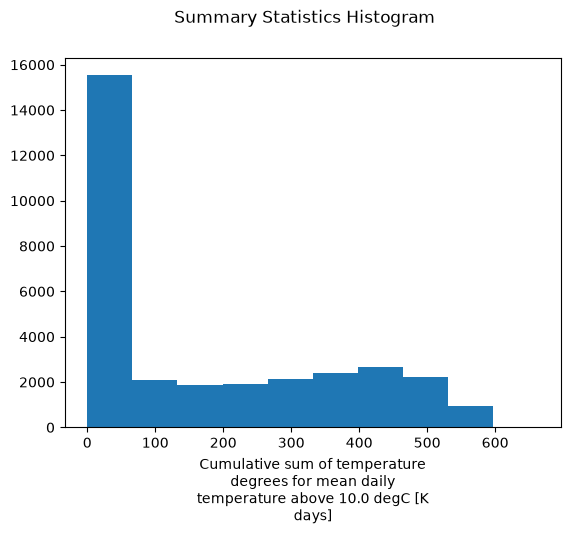
The xarray plot functions creates a histogram when the DataArray has 3 or more dimensions. In previous steps, xclim automatically filled the long_name and units attributes, which xarray uses to label the x-axis.
[13]:
import matplotlib.pyplot as plt

print("long_name:", gdd.growing_degree_days.attrs["long_name"])
print("units:", gdd.growing_degree_days.attrs["units"])

gdd.growing_degree_days.plot()
plt.suptitle("Summary Statistics Histogram")
plt.show()
long_name: Cumulative sum of temperature degrees for mean daily temperature above 10.0 degC
units: K days
When the DataArray only has a time dimension, xarray plots a timeseries. In this case, xarray uses the long_name and units attributes provided by xclim to label the y-axis.
[14]:
gdd.growing_degree_days.isel(lon=20, lat=10).plot()
plt.suptitle("Time Series at a Given Geographical Coordinate")
plt.show()
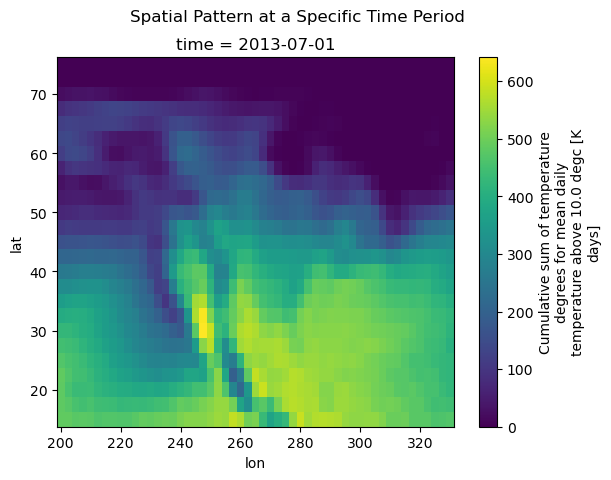
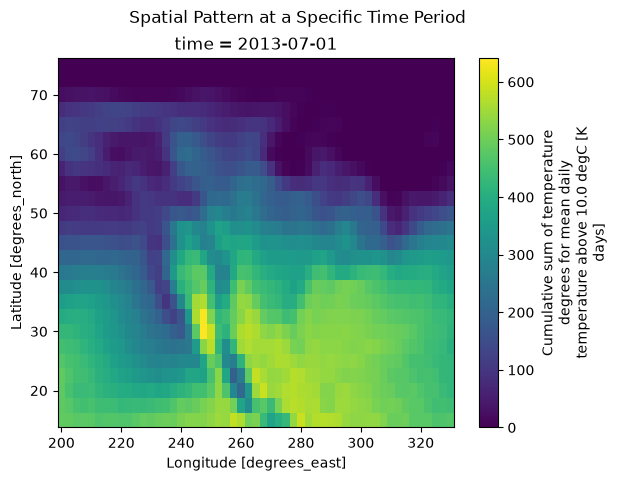
When the DataArray only has 2 dimensions, xarray plots a heatmap. In this case, xarray uses the long_name and units attributes provided by xclim to label the colorbar.
[15]:
gdd.growing_degree_days.sel(time="2013-07-01").plot()
plt.suptitle("Spatial Pattern at a Specific Time Period")
plt.show()
Writing DataArrays and Datasets to disk
To save the data as a new NetCDF, use to_netcdf:
[16]:
gdd.to_netcdf("monthly_growing_degree_days_data.nc")
It’s possible to save Dataset objects to other file formats. For more information see: xarray’s documentation